



Vollansicht
Ähnliche Gegenstände
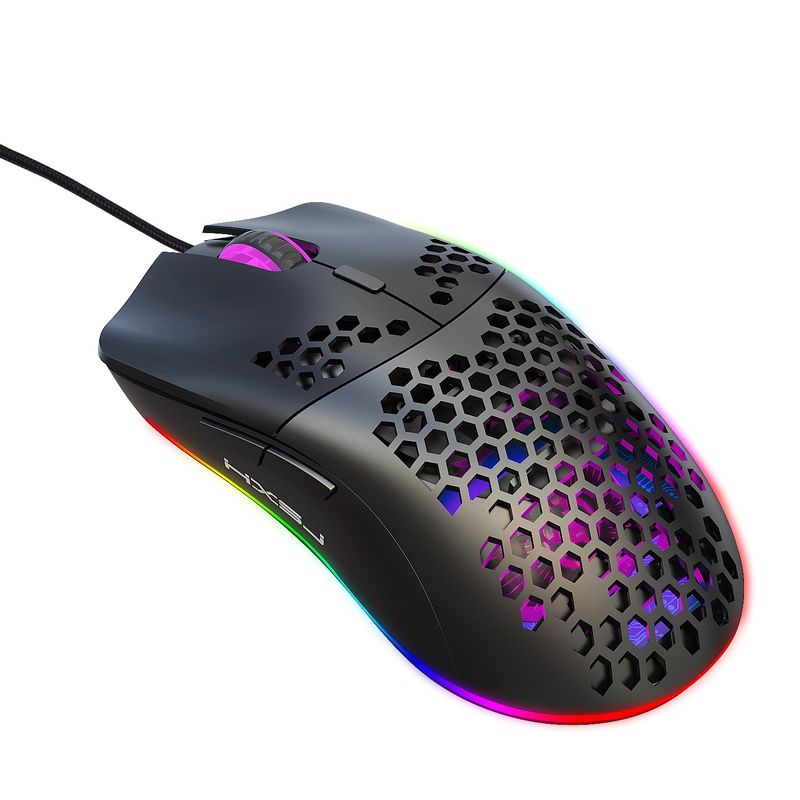
Dongdong RGB-Gaming-Maus mit Makroprogrammierung, 6 Tasten, Lichtsteuerung, unterstützt verschiedene kabelgebundene Mäuse, auf Lager
48,18€64,23€
Farbe : J900-6400DPI Black Hole Maus


Menge :

Bericht
Urheberrechtsverletzungen einschließenKostenlos Standardversand. Siehe Einzelheiten
Geschätzt zwischen Sun, May 31 und Thu, Jun 4
Sie können das Produkt innerhalb von 30 Tagen nach Erhalt zurückgeben. Siehe Einzelheiten
Sorgenfrei einkaufen

Geld-Zurück-Garantie
Erhalten Sie den bestellten Artikel oder Ihr Geld zurück. Mehr erfahren
Über diesen Artikel
Quelle: Aura Bits
Der Verkäufer übernimmt die volle Verantwortung für dieses Angebot.Artikelnummer: 36910102
Artikelspezifikationen
Herkunft
DE
Funktionen
RGB, gemischtes Licht, einzelnes Licht
Achse
Optische Achse, Grüne Achse, Teeachse
Numerische Tastatur
Nein Ja
Produktart
Mute-Maus, tragbare Maus, wiederaufladbare Maus
Verbindung
Verkabelt
Größe
<100 mm, > 130 mm, 100 mm bis 120 mm
Zertifizierung
CE, UL, GS
Artikelbeschreibung vom Verkäufer
Packing information and dimensions and weight of J900:
Cable length: 150 cm
Net weight of mouse: 95.6g
Mouse size: 13 * 6.6 * 4cm
Package weight: 148 g
Package size 14.8X9.8X5cm
Quantity of one box: 100
Box size: 55 * 52 * 32cm
Packing gross weight: 16.65kg
Download link for J900 macro programming software:
https://drive.google.com/file/d/1PYR7WgUaWbGpF387mnZrEsST1ezkuXsS/view?usp=sharing
Specifications:
Product model: J900 RGB Lighting Programmable Gaming Mouse
Rate of return: 125HZ
Moving speed: 28IPS
Rate: 4000FPS
Acceleration: 10G
Human body engineering design, comfortable grip, hollow design, more fashionable
6 programmable buttons
6 RGB lighting modes, can turn off the light
6-level adjustable DPI, Max 6400 DPI
Voltage rating / electric current: DC 5V / 100mA
USB plug and play
Switch life: 20 million cycles
Cable length: 150cm
Item Weight: 96g
Item Size:13*6.7*3.8 cmL * W * H
Package Weight: 147g
Package Size: 15*9.8*5cm
Win7 / Win8 / Win10 Vista 32-bit
IOS or latest
Packing list:
1 x gaming mouse
1 x User manual
How to use:
1.Do
Download the macro programming software through the website provided by the seller
2.After downloading, open it directly and use the buttons to customize the programming
3. When the mouse is successfully connected and used normally, open the J300 macro programming software directly to use the macro programming function
4.Adopt professional game chip, using high-performance program control decoder chip
for smooth motion and precise control
5.Button settings For the 1-6 buttons as shown, the drive supports custom settings
6.DPI setting: default 1000/1600/2400/3200/4800/6400 the six-segment DPI value can be adjusted
be any section
7. Light mode: RGB marquee effect, up to 6 lighting pattern designs, the light can be
turned off
8.Mouse parameters: You can set the pointer precision, wheel speed, and double click
speed
9.Custom Settings: Custom macro editing that supports
s game effects
10.When
The settings are complete, click Applications and then click Save Configuration. You should start the driver
Earn it the next time you use it so that you can use all the customization features
T66 is the upgraded wireless version, in stock, stay tuned Please click the product link below to view details:


Videos
Videos zu diesem Produkt

 4.4 von 5 basierend auf 9,249 bewertungen